
SMS & WhatsApp message scheduling
Write your message, pick the recipients and choose the exact date and time. VoidFix Gateway sends your SMS, MMS or WhatsApp message on schedule from your own number, so reminders and follow-ups go out without you.
- Live in under 5 minutes
- Sends from your own numbers
- No credit card for the trial
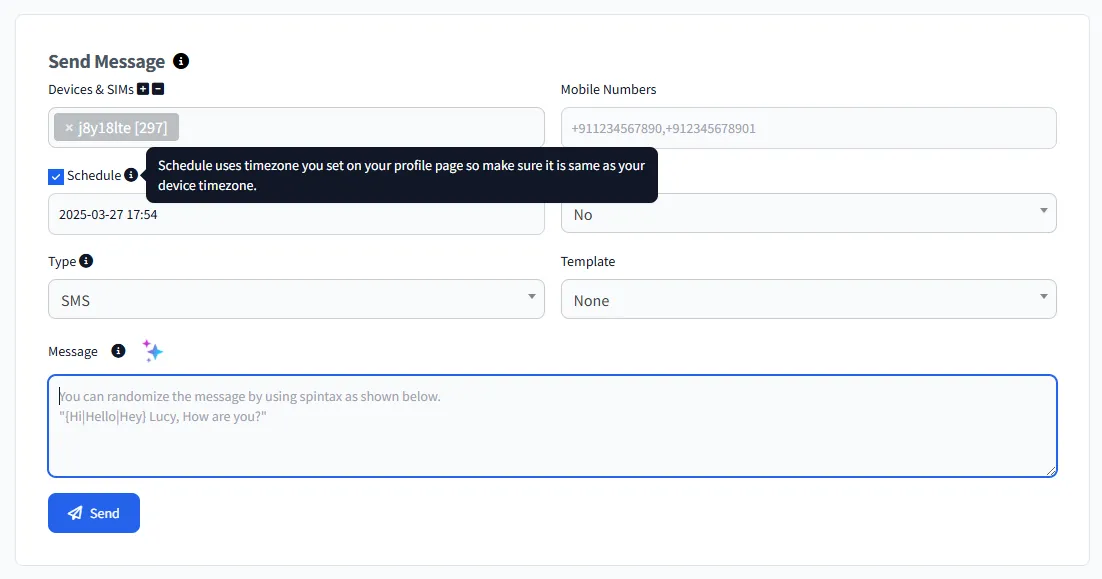
Send at the right time without being at your desk
Message Scheduling lets you write texts when it suits you and deliver them when it suits your customers. Set it once and VoidFix sends it on time.
Example: on Friday afternoon, schedule Monday's 9am reminders for everyone booked that day. They go out from your SIM on Monday morning while you're still making coffee. Keep the phone online and the VoidFix app running so scheduled messages can send.
Scheduling works for SMS, MMS and WhatsApp in the dashboard, and developers can set a send time with the schedule parameter in the REST API.
Why schedule your SMS and WhatsApp messages?

Save time and stay organized
Plan a week of messages in one sitting, then get on with your day.

Better timing, more reads
Send messages when people are most likely to read them.

Never miss important dates
Birthday wishes, reminders and follow-ups go out automatically.

SMS, MMS and WhatsApp
Schedule texts, picture messages and WhatsApp messages from the same dashboard.
How to schedule a message
Write your message
Write the message and select the recipients.
Set the date and time
Choose exactly when it should be delivered.
Let it send
VoidFix sends it on time from your connected number.
Scheduling details and limits
- What you can schedule: SMS, MMS and WhatsApp messages, to one contact or a whole group.
- Exact timing: pick the date and time each message should go out. Scheduled messages show under Scheduled in the dashboard until they send.
- Phone online at send time: the phone needs internet and the VoidFix service running. If it is offline, messages wait as pending or queued, and any that fail can be resent by message ID or campaign.
- Plans: included on every paid SMS and WhatsApp plan.
Scheduling from the API, Make and GoHighLevel
Developers add the optional schedule parameter (a date and time) to a single or bulk send request. Make, Zoho CRM and Bubble.io call the same endpoint, so they can pass a send time too. In GoHighLevel, the workflow decides when a text goes out, and VoidFix sends it from your SIM when that step runs.
Message scheduling FAQ
What happens if my phone is offline at the scheduled time?
The message can't leave the phone until it reconnects. It shows as pending or queued in the dashboard, and anything that fails can be resent by message ID or campaign. Keep the phone charged, online and running the VoidFix service.
Can I schedule messages through the API?
Yes. Add the optional schedule parameter with a date and time to a single or bulk request to the SMS send endpoint.
Can I schedule WhatsApp messages?
Yes. Scheduling works for WhatsApp in the same dashboard as SMS and MMS, on every paid WhatsApp plan.
Related VoidFix features
All included on paid plans, in the same dashboard as your numbers.
AI-crafted messages
Type a one-line prompt and get a polished, ready-to-send message.
Learn moreLead management
Import leads by CSV, sort them into groups and manage opt-outs.
Learn moreAuto replies
Send an instant reply when a text matches a keyword, a time of day or a channel.
Learn moreComprehensive dashboard
See pending, queued, scheduled, delivered and failed messages on one screen.
Learn moreSchedule your first message today
Start the 7-day free trial and set up next week's reminders now.