
SMS, WhatsApp & iMessage API integration
Use the VoidFix REST API to send SMS, MMS, WhatsApp and iMessage from your own application, through your own numbers. Pick your channel below to open its documentation, endpoints and examples.
- REST API with API-key auth
- SMS, MMS, WhatsApp & iMessage
- No per-message fees
Pick the API for your channel
One account, three channels. Each API has its own reference with endpoints, parameters and examples. New to VoidFix? Start at the developer hub.

WhatsApp API
Send and receive WhatsApp messages from your app with API keys from the WhatsApp portal (Tools → Keys).
View WhatsApp API docs
iMessage API
Send blue-bubble iMessages, read messages by ID or status, and resend from your app.
View iMessage API docs
SMS API
Send single or bulk SMS and MMS, schedule messages, manage contacts and list your devices.
View SMS API docs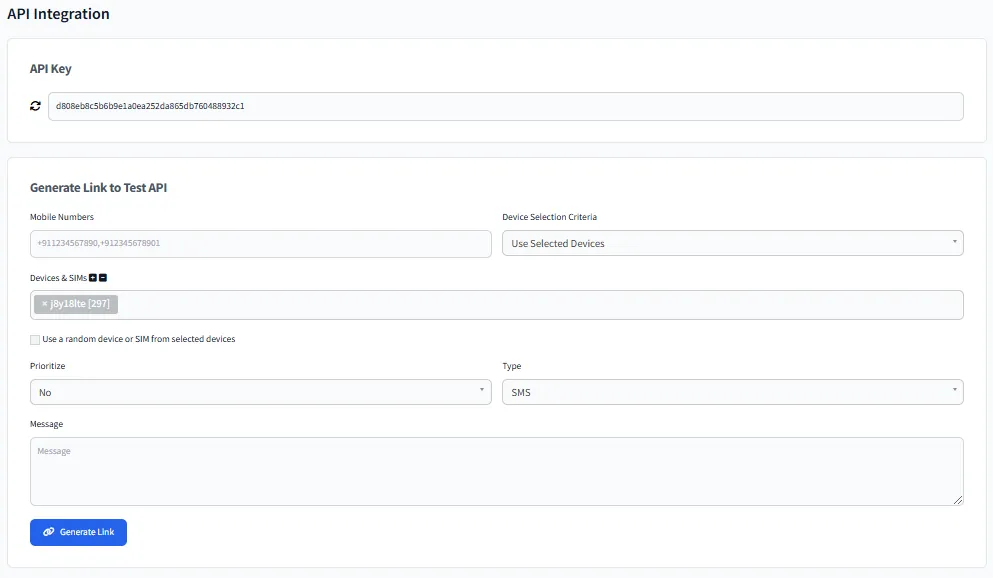
Authenticate with your API key
Every request is authenticated with your account API key (the key parameter), found in the portal's API section. The base URL for SMS and iMessage is https://sms.voidfix.com. For WhatsApp, generate keys in the WhatsApp portal under Tools → Keys.
Send a single message: main parameters
key: your API keynumber: recipient phone number in international formatmessage: message text (Spintax supported)devices: device ID(s) to send fromschedule: optional date-time to scheduleisMMS:trueto send MMSattachments: media URL(s) for MMSprioritize:trueto send ahead of the queue
From API key to first message
The SMS / MMS API in three steps. If you would rather not write code, the same key works with GoHighLevel, Zapier and Make.
Get your API key
Log in to the portal and copy your key from the API section (WhatsApp: Tools → Keys).
Send a request
POST to /services/send.php with your key, the recipient number, the message and the device to send from. Single and bulk sends are supported.
Track and manage
Read messages by ID, group ID or status, resend failed messages, manage contacts and list your connected devices.
SMS / MMS endpoints
The core endpoints at a glance. See the full SMS API documentation for every parameter and response.
| Endpoint | Method | Purpose |
|---|---|---|
/services/send.php | POST | Send a single or bulk SMS/MMS |
/services/read-messages.php | GET | Get messages by ID, group ID or status |
/services/resend.php | POST | Resend messages by ID or group ID |
/services/manage-contacts.php | POST | Add a contact or unsubscribe a contact |
/services/get-devices.php | GET | List your connected devices |
/ajax/zapier/get-contacts-list.php | GET | Get contact lists |
/ajax/services/create-contacts-list.php | POST | Create a contact list |
API limits and options
- Authentication: every request carries your account API key in the
keyparameter. WhatsApp keys come from Tools → Keys in the WhatsApp portal. - Bulk sends: pass a
messagesarray, and setuseRandomDeviceto rotate sending across your connected phones. - Priority and timing:
prioritizemoves a message to the front of the queue andschedulesets a send time. - iMessage: four endpoints to send, get by ID, get by status and resend. Each line reaches up to 50 unique contacts per day. See the iMessage API documentation.
- Pricing: no per-message fees. API sends are covered by your flat monthly plan.
Start at the developer hub
The VoidFix developer hub is the starting point for building on VoidFix, with links to the API reference for each channel. If you’d rather not write code, the same API key connects GoHighLevel, Zapier, Make, Zoho CRM and Bubble.io.
API integration FAQ
Where do I find my API key?
Log in to the SMS portal and open the API section in the left menu. For WhatsApp, generate a key under Tools → Keys in the WhatsApp portal.
Are there per-message fees for API sends?
No. Messages sent through the API are covered by your flat monthly plan, the same as dashboard sends. iMessage lines can reach up to 50 unique contacts per day each.
Can I send iMessages through the API?
Yes. Call the send-imessage endpoint with your key, the recipient number, the message and the device ID. The iMessage API documentation lists all four endpoints.
Related VoidFix features
All included on paid plans, in the same dashboard as your numbers.
Advanced socket messaging
A live link to your phone, so sends, delivery reports and replies arrive instantly.
Learn moreComprehensive dashboard
See pending, queued, scheduled, delivered and failed messages on one screen.
Learn moreLead management
Import leads by CSV, sort them into groups and manage opt-outs.
Learn moreSpintax
Give each recipient a different wording of the same text to reduce spam filtering.
Learn moreStart building today
Create your account, grab your API key and send your first message in minutes.